
Frequently asked questions
Quick answers to the most important questions.
Can't find your question? Ask it via the contact page and one of us will get back to you.
1. The app
Can I really do everything from my phone?
Yes. Approving requests, viewing your day schedule and rounds, adding customers and dogs, sending invoices: it's all in the DoggyDoggy app, on the business side. The web version is still there for when you'd rather sit down, but you don't have to.
Does the app work on iPhone and Android?
Yes, both. It's one app, in the App Store and Google Play, with its own side for you, for your staff and for your customers.
Can my staff use the app too?
Yes, that's included as standard. Your team works in the same app, on their own side: everyone sees their own round and their own dogs, with the notes per dog. Invoices, rates and settings stay with you.
Do my customers need the app too?
Not necessarily, you decide whether they get access to the app. But most customers who use it are happy with it: booking services, paying and seeing when their dog was picked up, all from their phone. For you it means requests come in neatly instead of via loose messages.
What if I run into something?
Send us a message and as a rule you'll have an answer within one working day.
Can I use DoggyDoggy in my browser too?
Yes. In your browser DoggyDoggy is the same app as on your phone, so on your laptop you pick up where you left off. Handy when you would rather sit down for a bit.
Does DoggyDoggy work in Belgium too?
Yes, DoggyDoggy works in the Netherlands and in Belgium. Belgian dog businesses already use it today, with the same scheduling, logistics and invoicing.
Which dog businesses is DoggyDoggy meant for?
For dog walking services, dog daycares, dog boarding and holiday boarding, dog schools, dog sitters and grooming salons: any dog business that schedules and invoices customers, dogs and services. Big or small does not matter, as long as it is a registered business.
2. Costs
How does passing on work?
The app costs are a percentage of the invoice amount excluding VAT. By default these costs are automatically passed on to the dog owner as a separate line: ‘App fee’. This line sits next to your own invoice lines, so your revenue stays the same.
Don’t want to pass it on (yet)? That’s fine. Then you turn off passing on and pay the platform costs yourself.
In practice customers rarely object: they get their own app in return, so they can arrange everything from their phone, and they see what that brings them.
Read more in our terms and conditions.
What does it cost?
On the Grow plan you pay 2% of the invoice amount excl. VAT of the invoices you send to dog owners. Example: on an invoice of €50 excl. VAT the app costs are €1. This commission is not refunded, not even for cancellations, credit notes, refunds or chargebacks.
The Start plan is free up to 10 registered customers (active and inactive count). From the 11th customer you automatically move to Grow.
Besides DoggyDoggy you also pay transaction costs to payment provider Mollie. Mollie processes payments via iDEAL/Wero or direct debit and is linked to DoggyDoggy.
Monthly invoice
At the end of each month you receive a clear invoice from us with all platform costs you owe Wicer. That way you can easily process it in your bookkeeping.
Note: do you have a Grow subscription (so more than 10 registered customers) and use DoggyDoggy, but don’t invoice through DoggyDoggy? Then you pay a fixed fee based on the number of customers in customer management: €3 per registered customer per month.
3. Switching
I already use another system. Can I bring my customers and dogs with me?
Yes. Your customers, dogs, fixed days and subscriptions migrate with you. We do it together with you, step by step, so nothing gets lost. Most of the time you'll spend is choosing a start date.
How long does switching take?
That depends on your size, but count on one quiet week of preparation and one moment of switching over. We've moved larger businesses with dozens of dogs a day without interrupting their schedule.
Am I tied to anything?
No. No fixed monthly fee, and you can stop at any time.
4. Day-to-day practice
Does DoggyDoggy support several dogs per round and other services?
Yes. You can create your own services (products), such as group walks or daycare. You decide the settings yourself and how clients see them in the app.
Can I plan regular dogs automatically on fixed days?
Yes. You can set fixed days, so recurring appointments are put into your agenda automatically.
How do cancellations, ad-hoc requests and exceptions work?
You set your own cancellation policy, for example changing or cancelling through the app up to 24 hours in advance. You can always add ad-hoc requests and exceptions by hand.
In case of a no-show you can turn the booking into a ‘no-show’ and still charge for it.
Does DoggyDoggy support pick-up and drop-off with several stops?
Yes. You can plan pick-up and drop-off rounds and optimise routes. You can then open the route in your navigation app in one go.
Do you have several vans? Then you can divide dogs over the vans and have that assigned (partly) automatically later on.
Can I record clear instructions per dog?
Yes. Instructions such as key information, behaviour or medication can be stored with the client or pet details. This information is visible in the day planning.
Can I use DoggyDoggy if I work on my own?
Yes. A one-person business counts, you do not need a team to work with DoggyDoggy. It is not meant for private individuals who walk a dog now and then: your business has to be registered.
5. What the dog owner sees
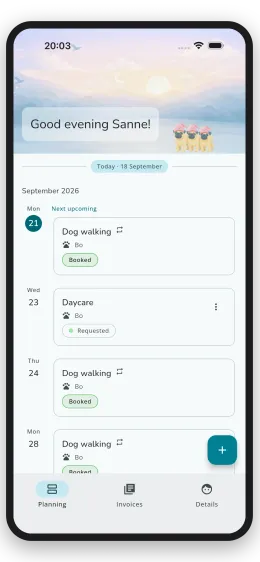
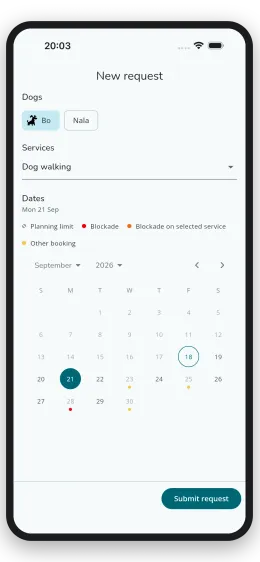
What can the client do in the app and how does booking work?
You give the client access to your portal. In the iPhone/Android app the client sees your tile with your company logo. Through that tile the client enters your environment.
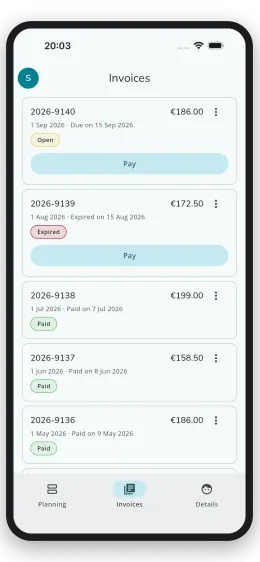
The client sees upcoming bookings, can make new requests, pay invoices and manage profile and pet details.
How do new clients sign up?
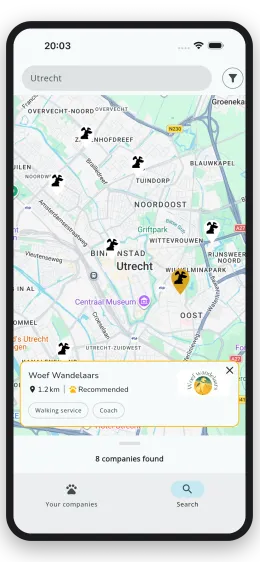
Your company can be visible on the DoggyDoggy website and in the app. New clients can find you there and sign up.
You approve or reject a sign-up. On approval the applicant is registered as a client.
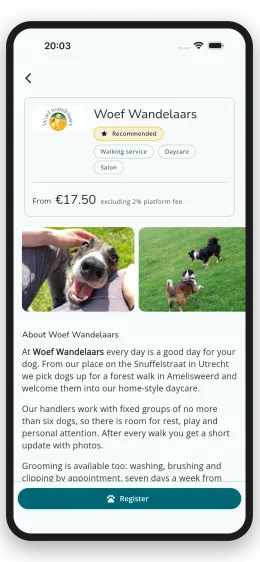
How easy is paying for clients?
Clients pay with one click in the app via iDEAL/Wero or direct debit. Invoices are marked as ‘paid’ as soon as the payment comes in. Is a client paying late? Then you send a reminder with one click, so you stay in control of your cash flow.
6. Data, GDPR and security
Does DoggyDoggy comply with the GDPR?
Yes. You will find our data processing agreement in the terms and conditions (article 10).
Where is data stored and how is it secured?
Data is stored within the EU. All data traffic is encrypted according to common standards.
7. Payments and money
Are my company details on the invoice to the dog owner?
Yes. Your company name, Chamber of Commerce number and VAT number are on the invoice.
When do I get paid out?
Payouts run through Mollie. In your Mollie account you choose how often you want to be paid out: daily, weekly or monthly.
How does direct debit work?
Through DoggyDoggy you request a SEPA mandate from your client (with a micro payment). After you send your invoice, DoggyDoggy starts the direct debit automatically, observing the statutory waiting period. The money arrives in your Mollie account. Does a direct debit fail? Then the invoice gets the status ‘chargeback’ and you decide what to do with it, for example offering it again.
Do I pay an extra app fee for reminders or demands for payment?
No, we charge no extra app fee for reminders and demands for payment.
Which payment methods are supported?
DoggyDoggy supports every payment method Mollie offers.
8. Integrations
Can you import my client base?
Yes. We are happy to help. Send us an e-mail about it.
How do I get invoices into my bookkeeping?
In DoggyDoggy you can easily export your outgoing invoices. That export can be imported into your accounting package.
9. Support
What support do you offer?
We answer support questions that come in through our support e-mail address as quickly as possible (usually within 2 working days).
Do you help with the setup?
Yes. We help you on your way at no extra cost. Usually two short sessions are enough to set everything up properly. We do the first invoicing run together.
10. Contract
Is there a contract term or notice period?
Your subscription can be cancelled monthly and there is no minimum term.
Can prices or conditions change?
Prices and conditions can change. If anything changes, we will inform you in advance.

Is your question not among them?
Get in touch with us! We are happy to help you further as soon as we can